
How To Choose The Right 70V Amplifier For Your Speaker System
Your Essential Guide to Choosing the Right Amplifier
When designing a commercial sound system, one of the most critical decisions is choosing the right amplifier for your speakers. Selecting the wrong amplifier could damage equipment or degrade your system's performance. This guide will help you understand how much amplifier power you need for your speakers, how to match amplifier and speaker power, avoid common pitfalls such as audio clipping, and ultimately how to choose an amplifier.
What Is An Amplifier For Speakers and How Does It Work? A 70V amplifier is an electronic device that amplifies the input signal to a level sufficient to drive your speakers. An amplifier converts an audio signal into wattage that powers your 70-volt speakers. 70V technology allows multiple speakers to run on a single line at a fixed wattage and constant voltage, simplifying large installations.
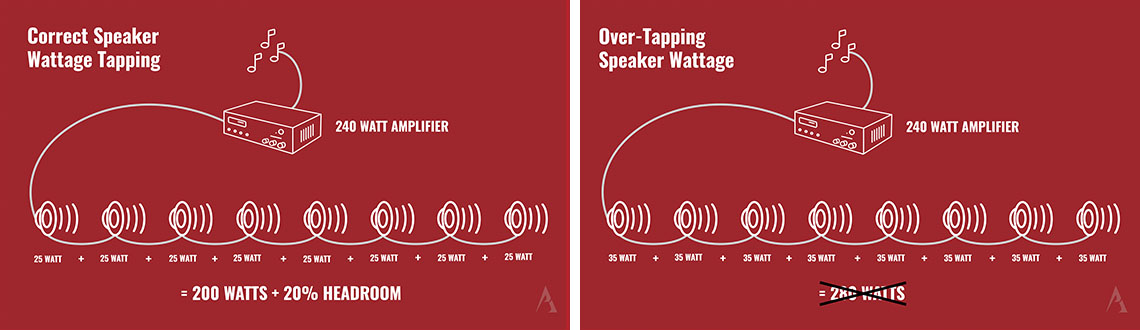
What Are 70V Speaker Tap Settings? Commercial speakers are equipped with a built-in 70V transformer and a tap setting dial. The tap setting determines the wattage drawn by the speaker, directly influencing its volume output. When installing a 70-volt speaker system, it's crucial to decide on the appropriate tap setting and configure it before installation. For most commercial settings like restaurants, setting the tap at a mid-level wattage is typically sufficient. However, environments with higher ambient noise levels, such as sports bars, may require higher tap settings for optimal performance. It's essential to ensure that the combined wattage of all speakers does not exceed the amplifier's capacity, maintaining at least a 20% headroom to prevent audio clipping.
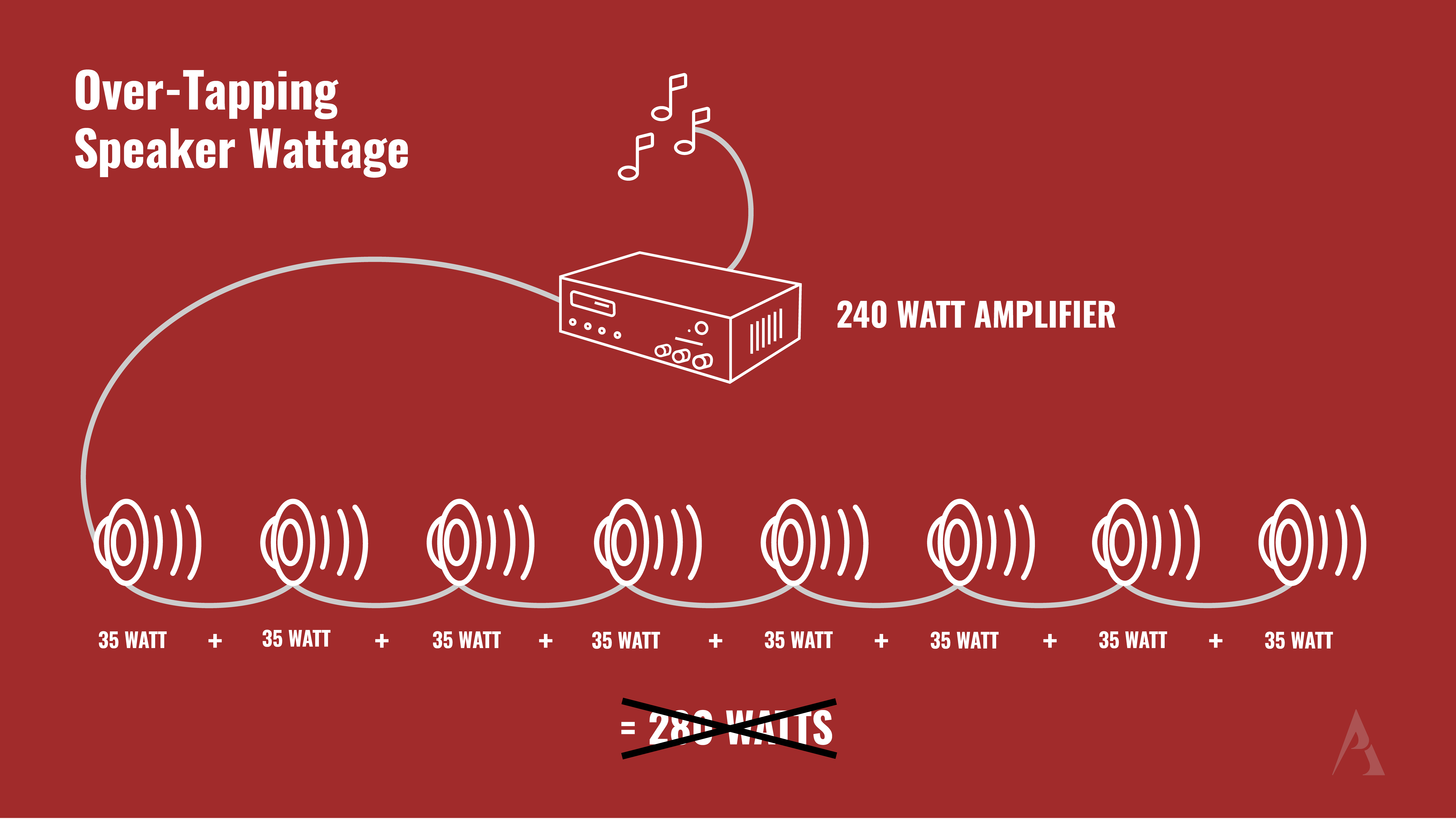
Why Is Headroom Important? Headroom refers to the extra power capacity above the total combined speaker wattage. This additional power is essential as it accounts for the fluctuations in the audio signal, such as the quietest and loudest parts of a song. Without sufficient headroom, the amplifier may struggle to handle these varying ranges, potentially leading to audio clipping and distortion.
What Is Audio Clipping? Clipping occurs when an amplifier is pushed beyond its limits, usually indicated by a clip light or a flashing red light on the amplifier. Clipping causes choppy or distorted audio, which can damage speakers and degrade sound quality.
How Much Amplifier Power Do You Need? To determine the necessary amplifier power needed for your 70-volt speakers, calculate the total wattage of all speakers at the desired tap setting and include an additional 20% for headroom. For instance, if you have two 25W speakers, you would require at least a 60-watt 70-volt amplifier (25 watts + 25 watts = 50 watts + 10 watts for 20% headroom).
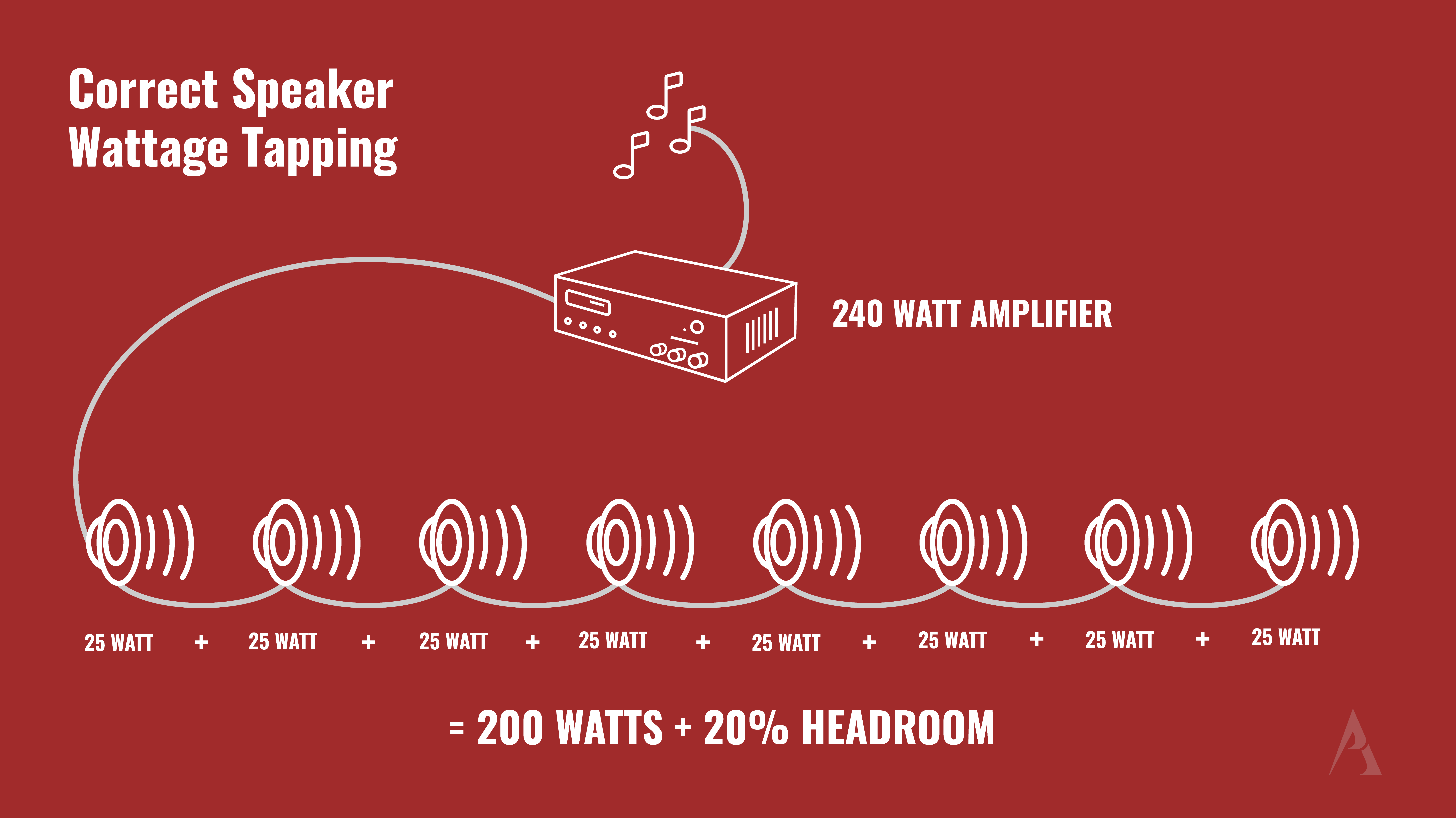
Can You Use An Overpowered Amplifier? With 70V speaker systems, using a higher wattage amplifier than needed is not a problem. The speaker transformer tap setting will limit the amount of wattage it draws, preventing overdrive or distortion of the speaker. More power provides flexibility and allows for expansion by adding more speakers or a subwoofer later.
How Can You Expand Your System? If you need more power, most 70-volt amplifiers have line-level or audio outputs to connect additional amplifiers. This lets you scale your system by repeating the process of how to match your amplifier and speaker power.
Choosing the right amplifier is crucial for optimal performance. Ensure your amplifier can provide enough power with extra headroom to avoid overdriving and damaging your system. If you need assistance on how to choose the right amplifier for your speakers, contact our commercial sound system experts at (888) 265-4112 or email us at sales@proacoustics.com.