
A Beginner’s Introduction to 70 Volt Commercial Multi-Source Multi-Zone Audio Control Systems
70-volt commercial audio systems are a powerful tool for delivering effective audio for your business, restaurant, school, or other commercial applications, especially when you take advantage of their multi-zone and multi-source capabilities. But first, you have to understand what a multi-zone amplifier is and how to set up a multi-zone speaker system.
We have created a beginner's introduction to 70-volt commercial multi-source, multi-zone audio control systems to help you better understand how to build a multi-zone audio system and to explain 70-volt technology, tap settings, volume controls, and the difference between volume zones and true multi-zone sound systems.
What is 70 Volt?
70-volt is a technology that allows you to connect multiple speakers and run each at a fixed voltage and constant wattage. You typically take one speaker wire and run it from the audio amplifier to multiple different speakers in a line, sometimes referred to as daisy-chaining.
What are taps/tap settings?
70-volt speakers have a built-in or mounted transformer that lets you adjust the amount of power they draw. This is referred to as a "tap" or "tap setting", and it allows us to determine how much wattage each speaker is receiving.
It's important to note that whenever we're building a commercial audio system, we need to ensure our 70V amplifier has sufficient power and adequate headroom. Approximately 20% of headroom is desired on an amplifier. So that means when we add up all our 70-volt tap settings, we want to be under 20% of the amplifier's rated wattage.
Creating Volume Zones with Tap Settings
One of the easiest ways to create multi-volume zones with a traditional single-zone 70-volt amplifier is to adjust your speakers' tap settings for different volume levels. For example, if we were designing a sound system for a restaurant, we would have a couple of speakers for the bar and the main dining area, and a couple of small ceiling speakers for the restroom and hallway. To make the experience a bit more customized for your space, we would create zones by setting some speakers at a higher tap setting and others at a lower setting to create different volume levels in the main dining area versus the restroom. Sometimes this is all the "zoning" we need.
- Since you can set each speaker to a different tap setting, you can set a lower or higher wattage based on where the speakers are installed.
- The disadvantage is that the volume difference for each space is fixed after installation, unless you remove the speakers to adjust the tap setting on the back of each one, or if the speakers happen to have the tap setting on the front.
Controlling Volume with Volume Controllers
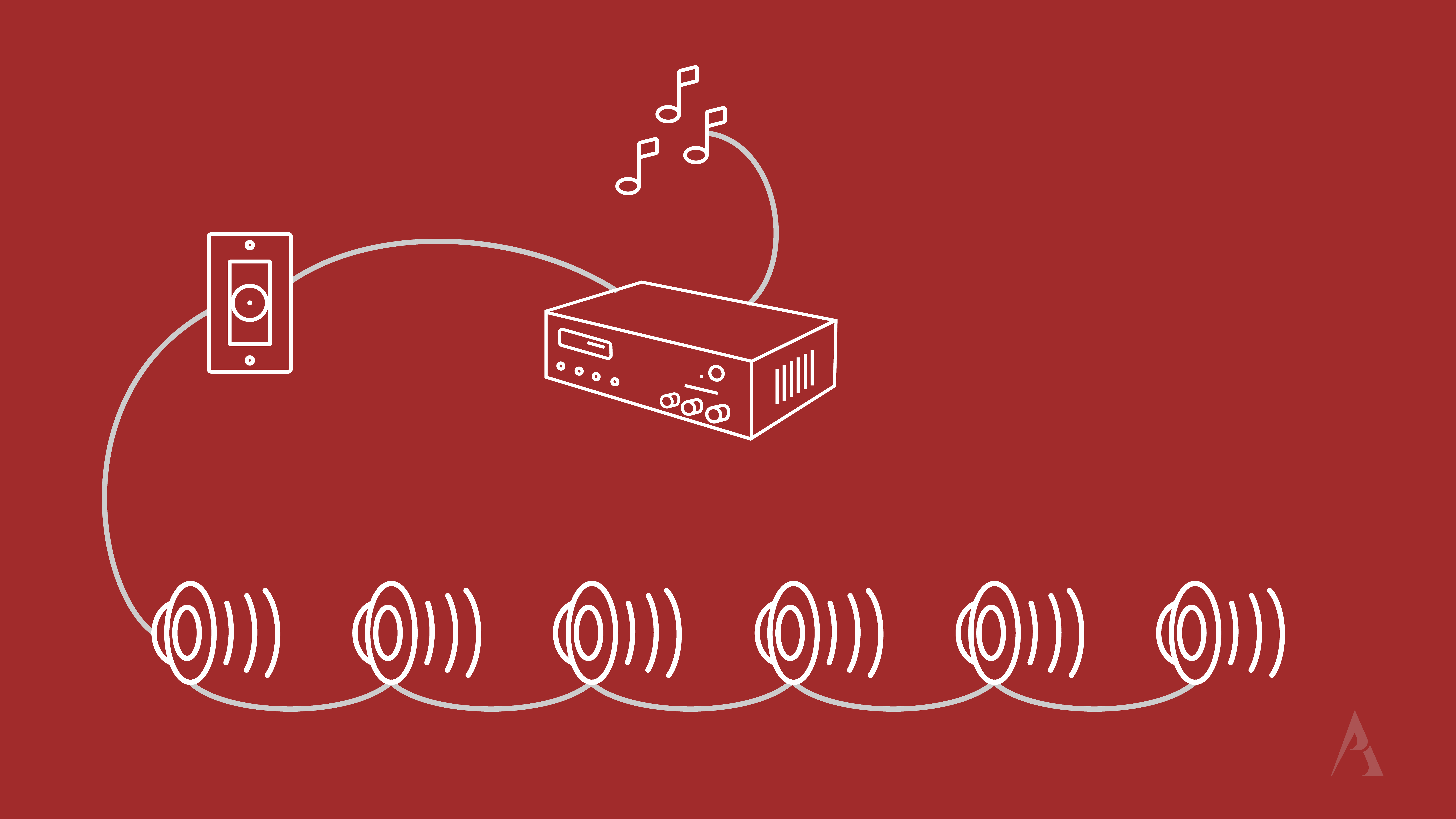
If you need additional volume adjustments, we can add in-wall or in-rack volume controls. Volume controls allow you to wire from the 70V amplifier to your volume control, then to the speaker so that you can attenuate the power from the amplifier to the speaker. We can think of volume controls a lot like dimmer knobs for lights, where you run a cable from your electrical panel to your dimmer knob, then out to your light fixture. You adjust the volume or the knob on the dimmer, and you lower the light, or in this case, the volume or wattage coming out of the speaker.
- Volume controls allow you to wire from your amplifier to the controller, then to your speakers.
- This allows you to control the volume with the wall controller instead of on your amplifier.
- There are many different types of volume controls available: white and black decora, stainless steel, keylock, with all levels of wattage.
Creating Volume Zones with Volume Controls
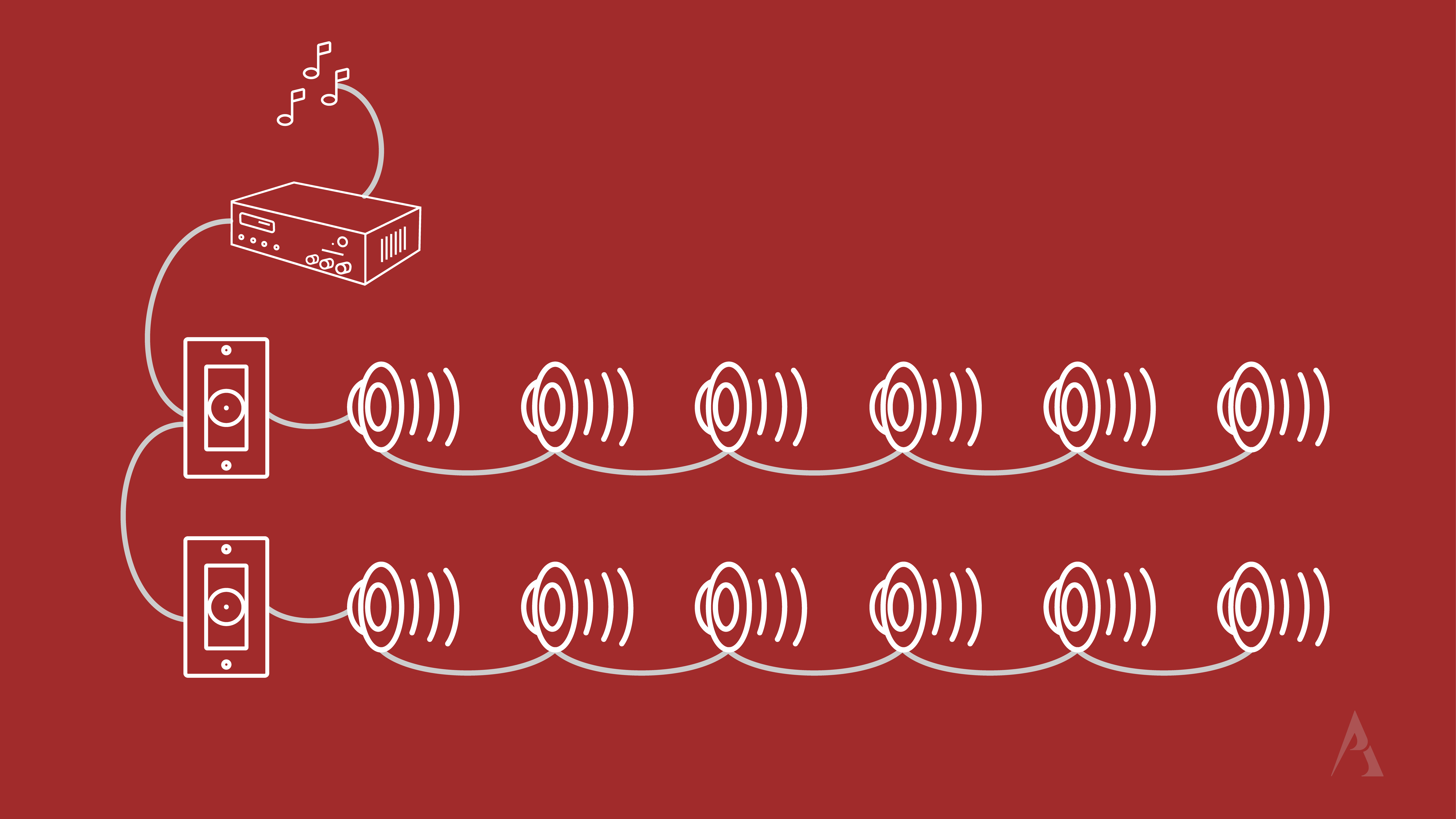
Another way to add volume zones to your application is to run multiple audio lines from the audio amplifier to individual wall volume controls, either in parallel or in series, and then connect your speakers. This will allow you to control the volume separately in each area where you've installed a controller, and it's a great way to create multiple volume zones. However, if we go back to the restaurant we talked about earlier, with a single-zone commercial amplifier, we can add zones with our volume controls, but all the speakers will play the same audio source in all areas. That means if we go to page table 32 to let them know that their food is ready, it's going to come out of all of the speakers. That's because we have only one main input zone, or source zone.
- You can wire in several volume controls, each connected to a separate set of speakers in different rooms or different areas of the same room.
- This allows you to control the volume separately in that space from the rest of the spaces.
- When creating volume zones, you are still restricted to playing the same audio source throughout the space. Only the volume level can be controlled separately.
TRUE Multi-Zone Speaker Systems
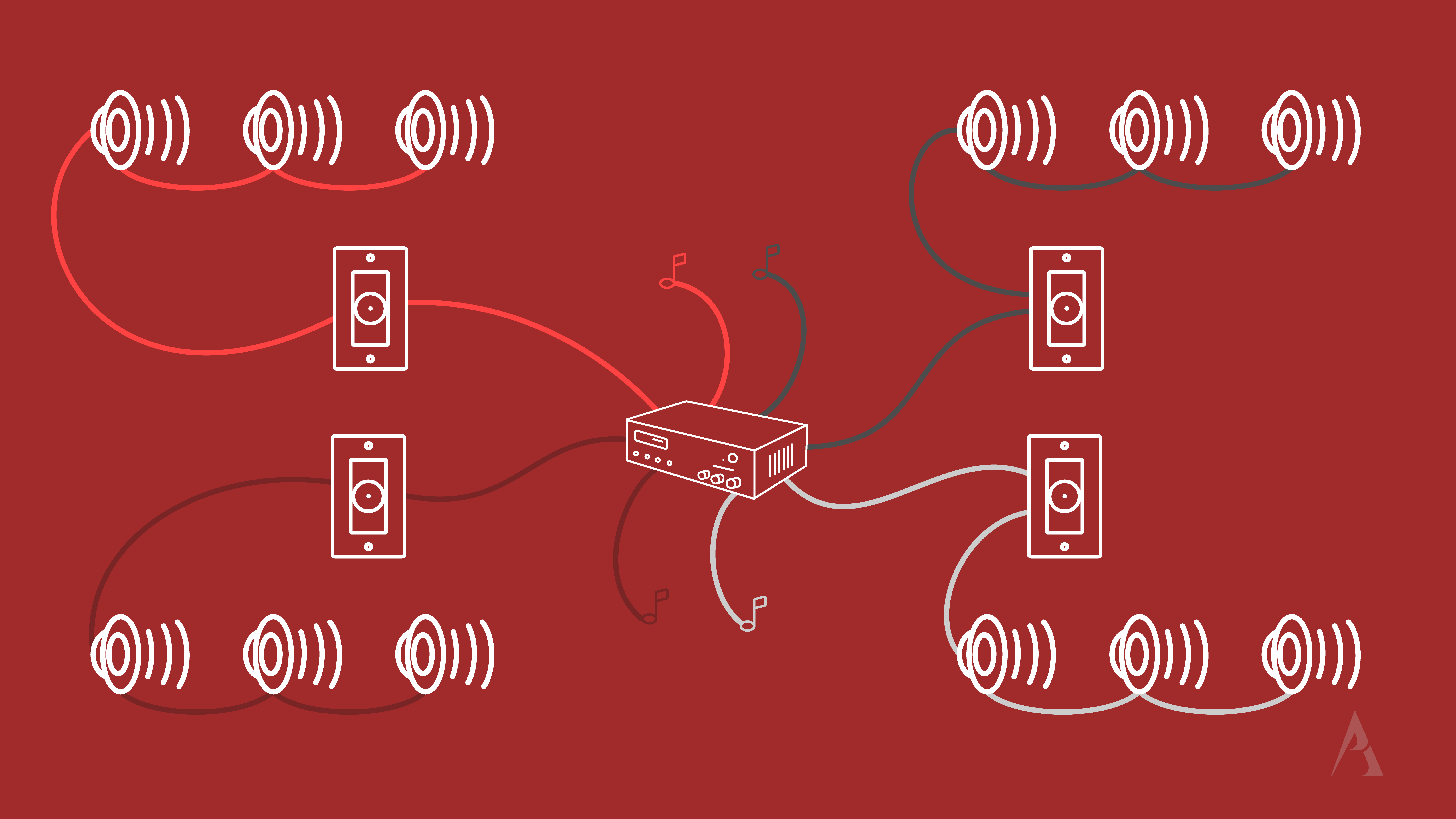
For some applications, it works well to have only multiple volume zones, but sometimes we need a true multi-source, multi-zone audio system. Thinking back to our restaurant example, we want to play different music in the main dining area and at a lower volume in the restrooms, or maybe we have an open ceiling area where we want to play the big game. For this type of application, you need a 70V multi-zone, multi-source amplifier, such as the Pure Resonance Audio RZMA120BT, a 4-zone commercial Bluetooth mixer-amplifier. Each output can play its own input source or any combination of input sources.
- For a truly multi-zone audio system, you'll need a commercial amplifier with multiple zones.
- A multi-zone amplifier allows you to connect a separate speaker chain to each zone and control each zone independently.
- This means you can send a different audio source to each of your zones.
- We can then mix and match the number of speakers and the wattages we have them tapped at in each zone.
- You can also connect your volume controls for each zone to gain more control over the audio in that space.
As always, make sure to check how much wattage you have per zone and give yourself 20% headroom.
If you have questions about multi-source or multi-zone amplifiers or music systems, give us a call at (888) 256-4112 or email us at sales@proacoustics.com. Our sound system experts are always happy to help!