
What is a PAD in Audio? | Passive Attenuation Devices Explained
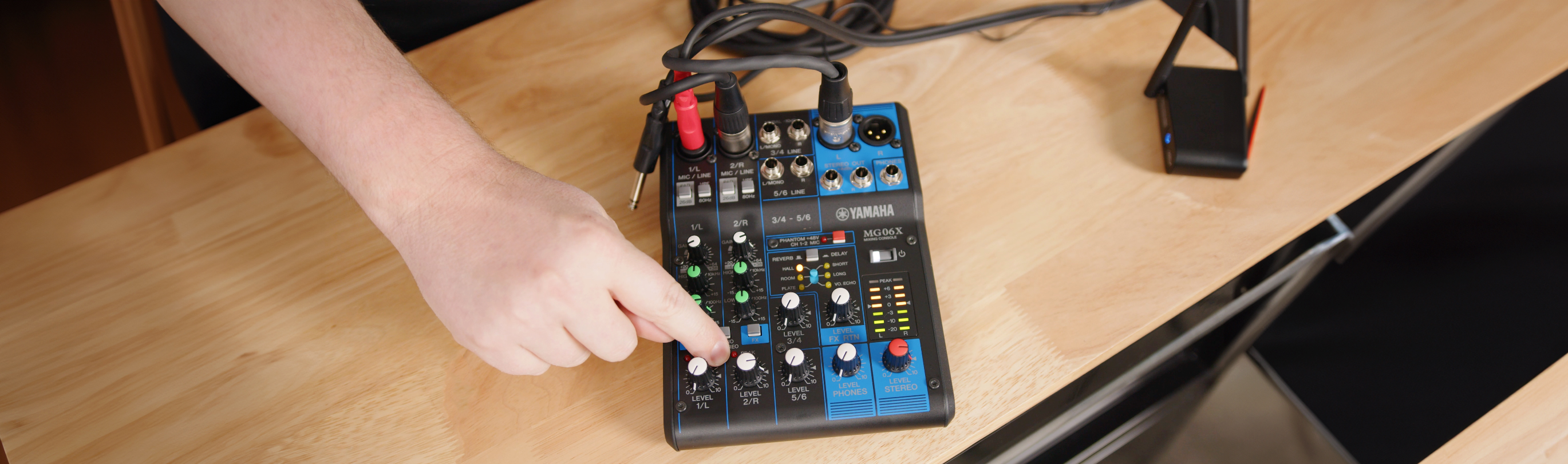
Struggling with managing audio levels or avoiding distortion? Whether you're mixing live sound, recording in the studio, or setting up a basic PA system, one small button on your mixer could save your audio from unwanted clipping and harsh distortion. It's called a PAD, short for passive attenuation device, and it's a simple but powerful tool that every audio engineer should understand.
In this post, we'll explain what a PAD does, when to use it, and how it works using the compact and reliable Yamaha MG06X mixing console as an example.
What Is a PAD Used For In Audio?
A PAD (Passive Attenuation Device) is an attenuator circuit designed to reduce the strength of an incoming audio signal before it reaches the next stage of the audio chain.
Instead of boosting or shaping your sound like an equalizer or preamp, a PAD simply lowers the signal's volume, often by 20, 26, or 30 decibels. This helps prevent distortion, clipping, and overloading, especially when you are working with high-level audio sources.
Why Use a PAD?
Let's say you're miking a snare drum, recording a guitar amp, or working with a powerful vocalist. In each case, the audio signal might be too strong for your mixer or interface to handle properly. When this happens, you may notice harsh distortion, crackling or clipping, or an overall muddy and overloaded sound.
This is when a PAD becomes helpful. By reducing the level of the signal, the PAD allows your equipment to process the sound cleanly without distorting.
Using the PAD on the Yamaha MG06X
The Yamaha MG06X digital mixing console includes PAD switches on its microphone-level inputs. Each one reduces the incoming signal by 26 decibels, which helps manage loud sources more easily.
Here's what happens in practice:
-
Without the PAD: A loud signal might cause the input to peak, leading to distortion.
-
With the PAD engaged: The signal is lowered to a manageable level, making it easier to dial in clean gain and avoid clipping.
This simple feature can make a big difference in achieving clean, professional audio.
What About Line-Level Sources?
Yes, you can and should use a PAD with line-level devices when they are connected to mic inputs. Devices like Bluetooth receivers, DJ controllers, or keyboards produce line-level signals, which are much stronger than mic-level signals. Without a PAD, these signals can overload your mixer's inputs.
Is It Okay to Leave the PAD Engaged?
Yes. It is completely safe to leave the PAD engaged if you are still getting a strong, clean signal.
If your levels are too low after applying the PAD, you may not need it in that situation. But when you're dealing with loud sources, using a PAD protects your equipment and improves your sound quality.
Other PAD Use Cases
PADs are not only found on mixers. You might also encounter:
-
Inline PADs: External devices that sit between a microphone or instrument and the mixer. These are great for mixers without built-in PADs.
-
Direct Boxes (DIs): Many DIs include built-in PAD switches to handle instruments with hot outputs, such as active basses or keyboards.
-
Microphones: Some condenser and ribbon microphones have switchable PADs to prevent distortion when capturing loud sources like drums, brass, or amplified guitars.
-
Audio Interfaces & Preamps: Input channels may include PADs to accommodate high-level signals without overloading the preamp.
-
Portable Recorders: Field and handheld recorders often offer PAD options for high-SPL recording situations.
-
Guitar & Bass Amplifiers: Some amps feature PAD inputs designed for high-output active pickups.
Conclusion
A PAD is a small but essential tool that helps you manage high audio levels and avoid distortion. Whether you are working with loud instruments, line-level sources, or powerful vocals, using a PAD lets you control your input levels with confidence.
The Yamaha MG06X mixing console makes it easy by including built-in PADs that help you get the best sound from your setup. Shop the MG06X today and reach out to a sales engineer if you have any questions about using a PAD in audio!