- Description
Details
A Smarter, Faster Path to Great Live Sound
StageScape® M20d is the world's first smart mixing system for live sound. Utilizing a groundbreaking touchscreen visual mixing environment, StageScape M20d streamlines the way you mix to get your sound dialed in quickly and stay in the creative zone. Massive DSP power delivers comprehensive, professional audio processing on every channel including multi-band feedback suppression. Pristine audio quality will impact your stage performances, and multi-channel recording allows you to easily capture every rehearsal or show, with or without a computer. The entire system can be controlled remotely from the stage or audience with one or more iPad® devices. StageScape M20d is the integrated professional mixing system that delivers great live sound, so you can focus on what’s most important: your performance.
With 18 analog inputs and 2 additional digital inputs, StageScape M20d is the most powerful and flexible portable mixer on the planet. Every channel features a professional suite of Dynamics, EQ and FX processors including multi-band feedback suppression. Connect one or more iPad® devices for full remote control over your mix. Set individual monitor mixes from the stage, tweak the FOH mix from the audience and more. Enhance your live sound experience with Fader View options and signal chain presets created by A-list artists.
Touchscreen Visual Mixing
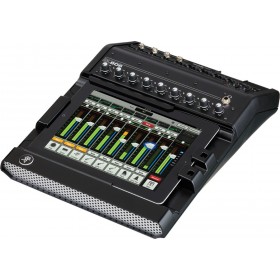
StageScape M20d features an intuitive, 7” full-color resistive touchscreen interface to get you mixing fast. The touchscreen displays icons on a stage that represent each performer or input, replacing generic rows of knobs and faders. Now you can reach for elements in the mix as you see them on the stage in front of you. A single touch on a performer’s icon gives full access to all parameters relating to that channel, from basic tweaks through deep effects editing.
Intelligence is built into every aspect of the StageScape M20d visual mixing environment. As soon as you plug in mics or instruments, the screen shows a Stage Icon Gallery that allows you to choose from a variety of icons, representing the most common input types and devices (male/female vocal, keyboards, drum kits, electric and acoustic guitars, etc.). You can use these icons to make a visual representation of the actual stage you are setting up. Need to adjust the level on the lead vocal? Just tweak the illuminated encoder that’s color-matched to what you see on screen. Want to pan the guitar? Just touch its icon and you have full access to all of the parameters related to the guitar channel.
StageScape encourages you to stay in the creative mindset of a musician. Using simple descriptors like “bright” or “punch,” StageScape enables you to quickly get to sounds that require multiple parameter changes. The innovative X-Y interface allows you to adjust everything with one finger — what used to be many adjustments becomes a swipe of the touchscreen. Instead of getting caught up in analytics, StageScape enables you to use your ears to achieve great vocal and instrument sounds.
Fader View
For a more traditional mixing experience, you can instantly switch to Fader View and use virtual faders to mix inputs and groups, FX returns, main and monitor outputs, and more. Fader View also enables you to mix monitor sends on faders for those “Can I get more me in my monitor?” moments. And when your singers want to hear reverb or delay on their vocals, you can send master effects to their monitors. Easy and intuitive, these features are typically only found on more expensive digital consoles.
Fader View is available on the StageScape M20d display as well as the StageScape Remote iPad app. For the best of both worlds, you can use Stage View and Fader View together. For example, set StageScape M20d to Stage View and your iPad to Fader View and bank through faders simply by touching icons on the stage. It’s a faster, more intuitive experience than you get with other digital consoles.
Auto-sensing Inputs and Outputs
From solo performances to full band shows, setting up for gigs is fast and easy. With auto-sensing inputs throughout, StageScape M20d activates each microphone or line input as soon as you plug in a cable and automatically configures a custom channel strip setting that includes essential gain, EQ, effects and routing. The monitor and main outputs work the same way. Plug in a PA speaker or monitor and it immediately appears on the touchscreen and output signals are automatically routed.
Control the Mix via iPad, Wherever You Are
The convenience of mobility has become integral to so many aspects of our lives, and the M20d extends that convenience to the stage. Connect one or more iPad devices simultaneously (via a compatible USB WiFi adaptor) for complete remote control over all mixer functions. Adjust the front-of-house mix from anywhere in the audience.
Each iPad can control different screens or different parameters in addition to the mixer’s own touchscreen. Whether you’re a band member adjusting your monitor mix or a sound man out in the audience, you’ve got full control.
With StageScape, you can walk around the venue with an iPad and adjust the front-of-house mix from anywhere in the audience. If band members have iPad devices, they can also benefit from this feature. Performers can manage individual monitor mixes from their locations, so everyone always has the mix they want. The dream of being able to mix from anywhere in the room is now a reality.
- Features
Features
Inputs/Outputs Features:
- 20 inputs: 18 analog and 2 digital
- 12 high-performance, digitally controlled, auto-sensing mic/line inputs
- 4 additional auto-sensing balanced line inputs
- 2 digital streaming inputs direct from computer, USB drive or SD card
- Stereo line inputs for integrating MP3 players or other sound sources
- 4 auto-sensing monitor outputs on balanced XLR connectors
- 2 auto-sensing main outputs on balanced XLR connectors
- L6 LINK™ multi-channel digital networking for integrating L6 LINK-enabled speaker systems
Control Features:
- Touchscreen visual mixing environment
- Remote control capability via one or more iPad® or iPad® 2 devices
Recording Features:
- Multitrack recording to SD card, USB drive or computer
- Place markers in sessions for quick access to parts of a track
- Import multitrack backing tracks from external sources
- Quick-capture recording to internal memory for sound check
Processing Features:
- Internal 32-bit floating point audio processing
- Massive DSP power provides parametric EQs, dynamic EQs, compressors, multi-band compressors, gates, delays, limiters and more
- Multi-band feedback suppression on every mic input
- 4 stereo master effects engines including reverbs, delays and vocal doubler
- Virtually unlimited I/O Setups, Scenes and Channel Processing Presets
- Specification
Inputs/Outputs Specifications System Type 20-input live sound digital mixer Mic Inputs 12 high-performance, digitally controlled, auto-sensing mic pres, switchable +48V Line Inputs 16 auto-sensing line inputs Digital Streaming Inputs 2 digital streaming inputs direct from computer, USB drive or SD card Stereo Inputs Stereo line input for integrating MP3 players orother sound sources Monitor Outputs 4 auto-sensing monitor outputs on balanced XLR connectors Main Outputs L+R auto-sensing main outputs on balanced XLR connectors Pad (Inputs/Outputs) 12dB (-10dBu to +4dBu) Digital Networking L6 LINK multi-channel digital networking for integrating L6 LINK-enabled speakers Control & Recording Specifications Touchscreen On-board touchscreen visual mixing environment, 7” resistive touch Remote Control Remote control capability via one or more iPad®devices* WiFi Networking WiFi host capability via USB WiFi adapter Channel Groups Multiple channels can be groupedonto one encoderfor grouped volume control Recording Multi-channel recording to computer, USB drive or SD card Quick Capture Quick Capture recording to internal memory for sound check Processing Specifications Processing Internal 32-bit floating point audio processing Converters 24-bit, 48kHz Channel Audio Processing Parametric EQs, dynamic EQs, multi-band compressors, gates, limiters, mod and more Feedback Suppression Multi-band feedback suppression on every mic input Effects Engines 4 stereo master effects engines including reverbs, delays and vocal doubler Memories Virtually unlimited I/O Setups, Scenes, and Channel Presets USB Backup Back up Setups, Scenes, Presets and more directly to USB stick or SD card Frequency Response 20Hz-20kHz ± 0.2dB Max Level Input, XLR on Combi +15dBu SNR, XLR on Combi -113dB THD+N, XLR on Combi <0.006% (1kHz @ +0dBu), <0.02% (1kHz @ +15dBu) CMRR, XLR on Combi 47dB-63dB Max Level Input, ¼” on Combi +28dBu (with 12dB pad) SNR, ¼” on Combi -114dB THD+N, ¼” on Combi <0.006% (1kHz @ +0dBu), <0.02% (1kHz @ +28dBu) CMRR, ¼” on Combi 47dB -63dB Max Analog Gain, on Combi 60dB Max Level Input, ¼” Line Inputs +21dBu (with 12dB pad) SNR, ¼” Line Inputs -109dB THD+N, ¼” Line Inputs <0.006% (1kHz @ +0dBu), <0.03% (1kHz @ +21dBu) CMRR, ¼” Line Inputs -70dB Max Level Output, Main L/R +21dBu SNR, Main L/R -117dB Max Level Output, Monitor Outs +20dBu SNR, Monitor Outs -114dB Dimensions (H x W x D) 4.7" (120 mm) x 16" (406 mm) x 13.3" (337 mm) Weight 12.3 lbs (5.5 kg) - Reviews
Write Your Own Review
GET RELIABLE FREE SHIPPING* WITH CODE: FREESHIP
*Valid On Orders $199+ & Under 60lbs - Click Here For More Details

Quote 0 item
Recently added item(s) ×
You have no items in your quote.
Cart 0 item
Recently added item(s) ×
Your cart is empty.



Ordering
About Pro Acoustics
We Accept